Pinterest Video Guide
How to Save a Pinterest Video to Camera Roll
Pinterest makes it easy to save Pins to your account, but saving the actual video file to your phone is a different process. The easiest method is to copy the video link, download the file, and then save it to Photos, Camera Roll, or Gallery.
Can You Save a Pinterest Video Directly to Camera Roll?
Pinterest's Save button normally saves a Pin to your Pinterest account or board. It does not always save the actual video file directly to your phone's Camera Roll or Gallery.
If you want an offline copy of a public Pinterest video, copy its Pin link and use the Pinterest Video Downloader to process the available video.
How to Save a Pinterest Video to Camera Roll
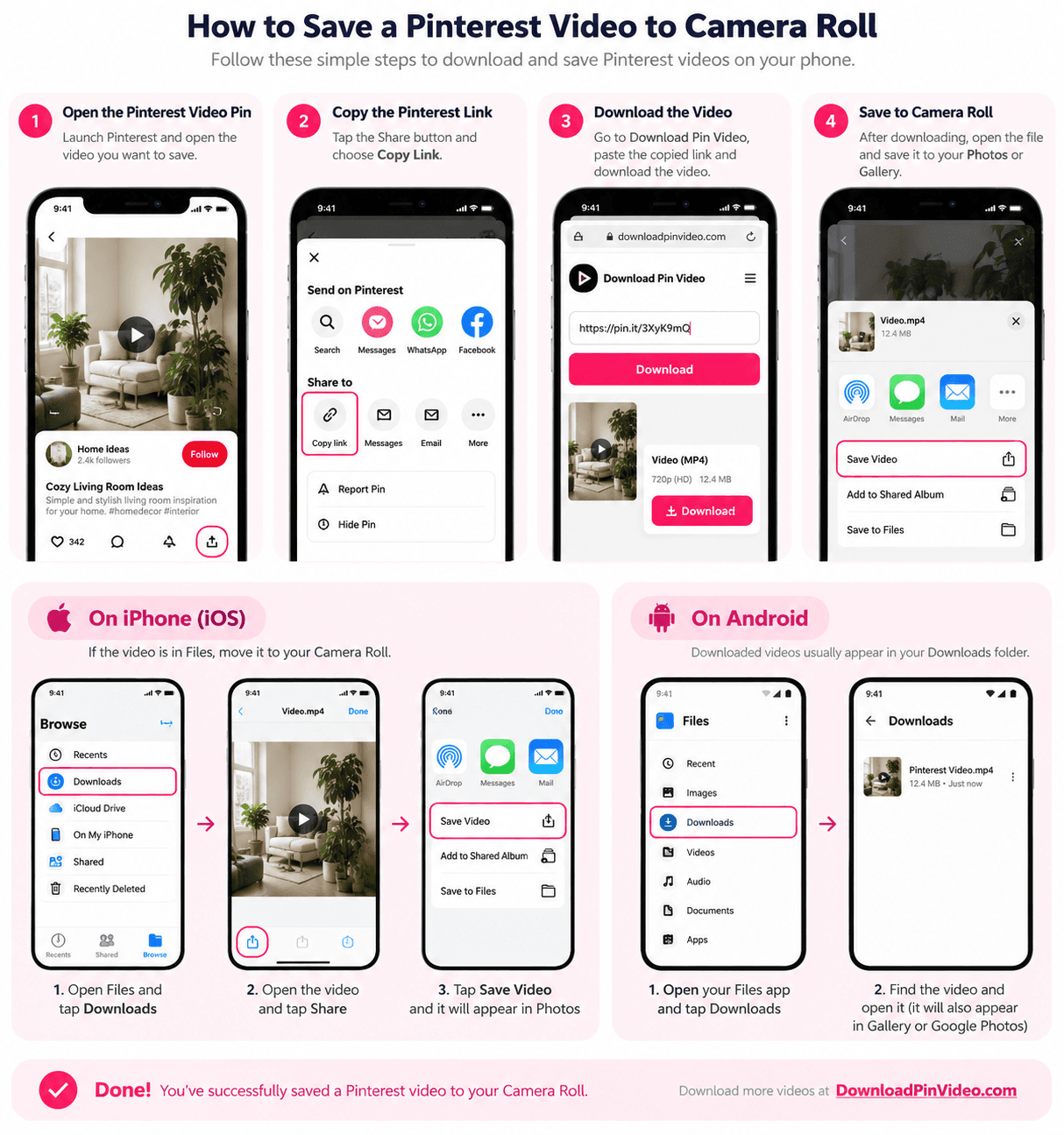
1. Open the Pinterest Video Pin
Open Pinterest and select the video you want to save. Make sure you are viewing the individual video Pin rather than a board, profile, or feed page.
2. Copy the Pinterest Video Link
Tap the Share button and choose Copy Link. Pinterest links may use a regular pinterest.com address or a shorter pin.it link.
3. Download the Video
Paste the copied link into Download Pin Video and process the Pin. Choose the available video option and let your browser download the file.
If you need a broader explanation of the download process, read our guide on how to download Pinterest videos.
4. Save the File to Photos or Gallery
After the download finishes, locate the file on your device. On iPhone, it may first appear in Files. On Android, it commonly appears in Downloads or your file manager.
How to Save a Pinterest Video to Camera Roll on iPhone
On iPhone, downloaded videos may first go to the Files app rather than directly into Photos.
- Open the Files app.
- Tap Browse and open Downloads.
- Find and open the downloaded Pinterest video.
- Tap the Share icon.
- Choose Save Video when the option is available.
The video should then appear in the Photos app, commonly under Recents. If you used Safari, you can also use Safari's download button to locate recently downloaded files.
How to Save a Pinterest Video to Gallery on Android
Android devices usually save downloaded videos in the Downloads folder.
- Open your browser's Downloads section or file manager.
- Open the Downloads folder.
- Find the Pinterest video.
- Open it to confirm that the file plays correctly.
- Check Gallery or Google Photos.
Many Android phones detect downloaded videos automatically. If the video does not appear in Gallery, you can move it from Downloads to a video or media folder.
Pinterest Video Downloaded but Not Showing in Camera Roll?
If the download completed successfully but the video is missing from Camera Roll or Gallery, check the Downloads folder first.
On iPhone, open the file through Files and use Share → Save Video. On Android, use your file manager to confirm the video is stored in a location that Gallery or Google Photos can access.
Also make sure the download completed fully. An incomplete or unsupported file may not appear or play correctly.
Where Are Downloaded Pinterest Videos Saved?
On iPhone, downloaded files commonly appear in Files → Downloads.
On Android, they commonly appear in Files or File Manager → Downloads. Some browsers also provide their own Downloads section where you can open recently downloaded files directly.
Can You Save Pinterest Videos Without Installing an App?
Yes. A browser-based downloader works from Safari, Chrome, or another modern browser, so you do not need to install a separate downloader app.
You only need the public Pinterest video link and an internet connection.
Want to Save Pinterest Photos Too?
Saving images is different from downloading video files. If you also want to keep Pinterest images on your phone, read our guide on how to save Pinterest photos to Camera Roll.
Frequently Asked Questions
Why did my Pinterest video download to Files instead of Camera Roll?+
On iPhone, Safari and other browsers may save downloaded files to the Files app first. Open Files, go to Downloads, open the video, tap Share, and choose Save Video when available.
Where do downloaded Pinterest videos go on Android?+
They commonly appear in the Downloads folder and may also show automatically in Gallery or Google Photos, depending on your phone and browser.
Can I save Pinterest videos without installing an app?+
Yes. You can use a browser-based Pinterest video downloader in Safari, Chrome, or another modern browser without installing a separate downloader app.
Can I save Pinterest videos without the Pinterest app?+
Yes. If you already have the public Pinterest Pin link, you can process it in a supported browser-based downloader without having the Pinterest app installed on that device.
Download or reuse Pinterest videos only when you have permission or the content is your own.
Save a Pinterest Video to Your Phone
Paste a supported public Pinterest Pin into Download Pin Video and check the available video.
Open Pinterest Video Downloader