Pinterest Video Downloader
Pinterest video download made simple. Paste a public Pinterest Pin link, preview the available video and download it directly to your device in just a few clicks.
How to Download Pinterest Videos
Downloading media from a public Pinterest Pin takes only three simple steps.
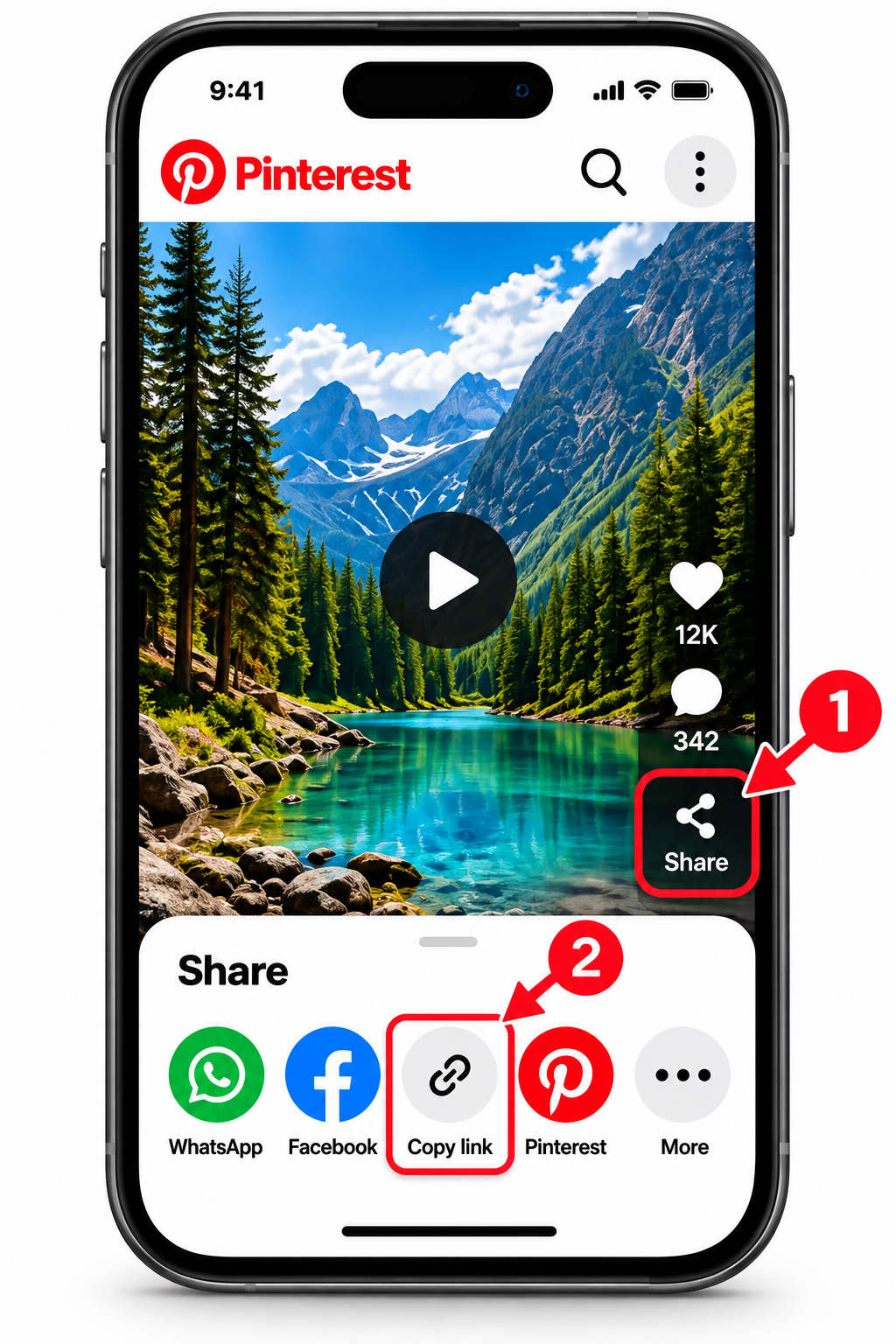
Copy the Pinterest Pin Link
Open Pinterest and select the Pin you want to save. Use the Share option or three-dot menu and copy the direct link to that Pin.
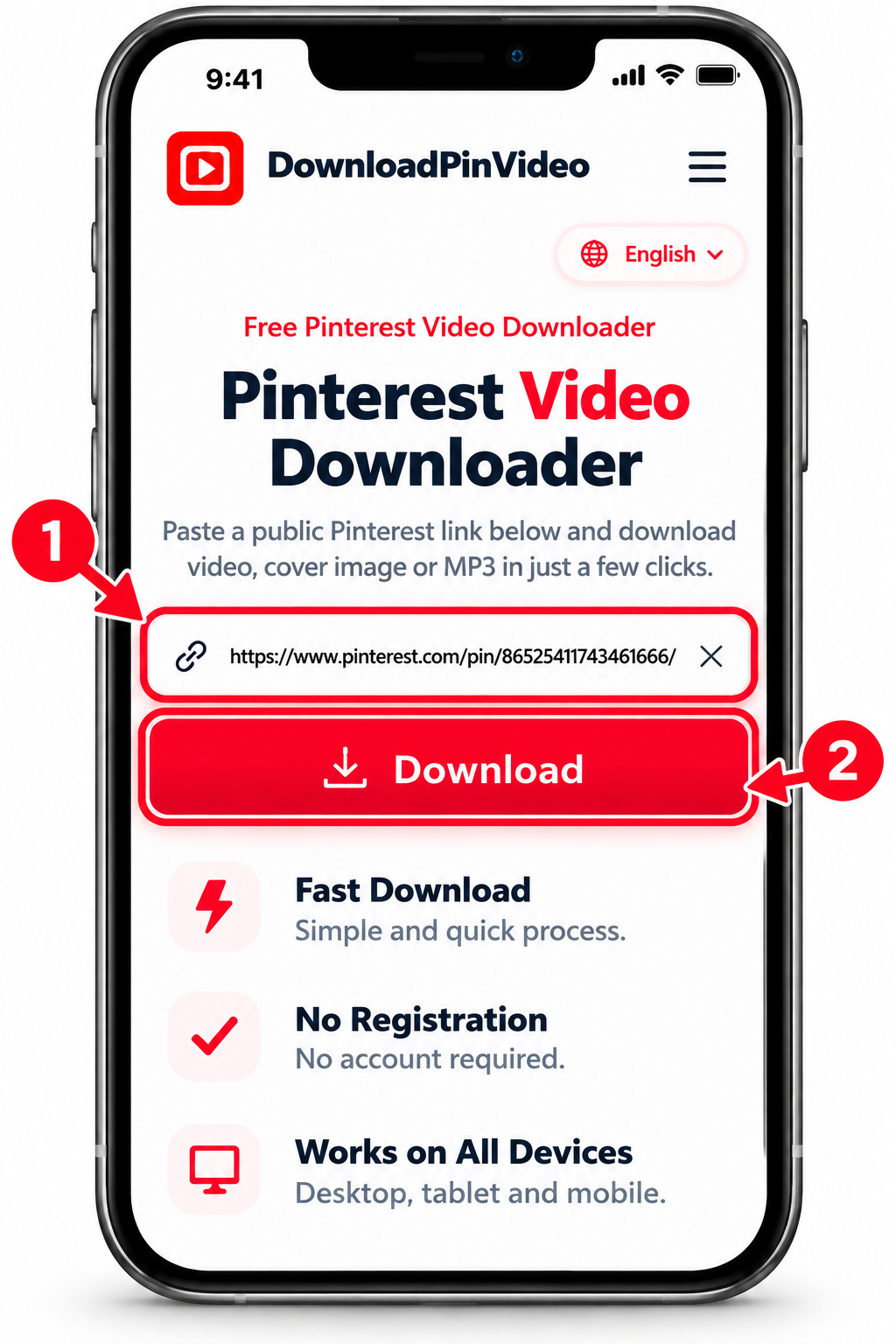
Paste the URL
Return to DownloadPinVideo, paste the copied link into the download box, and press the Download button. The tool will check the Pin and identify the media available from the source.
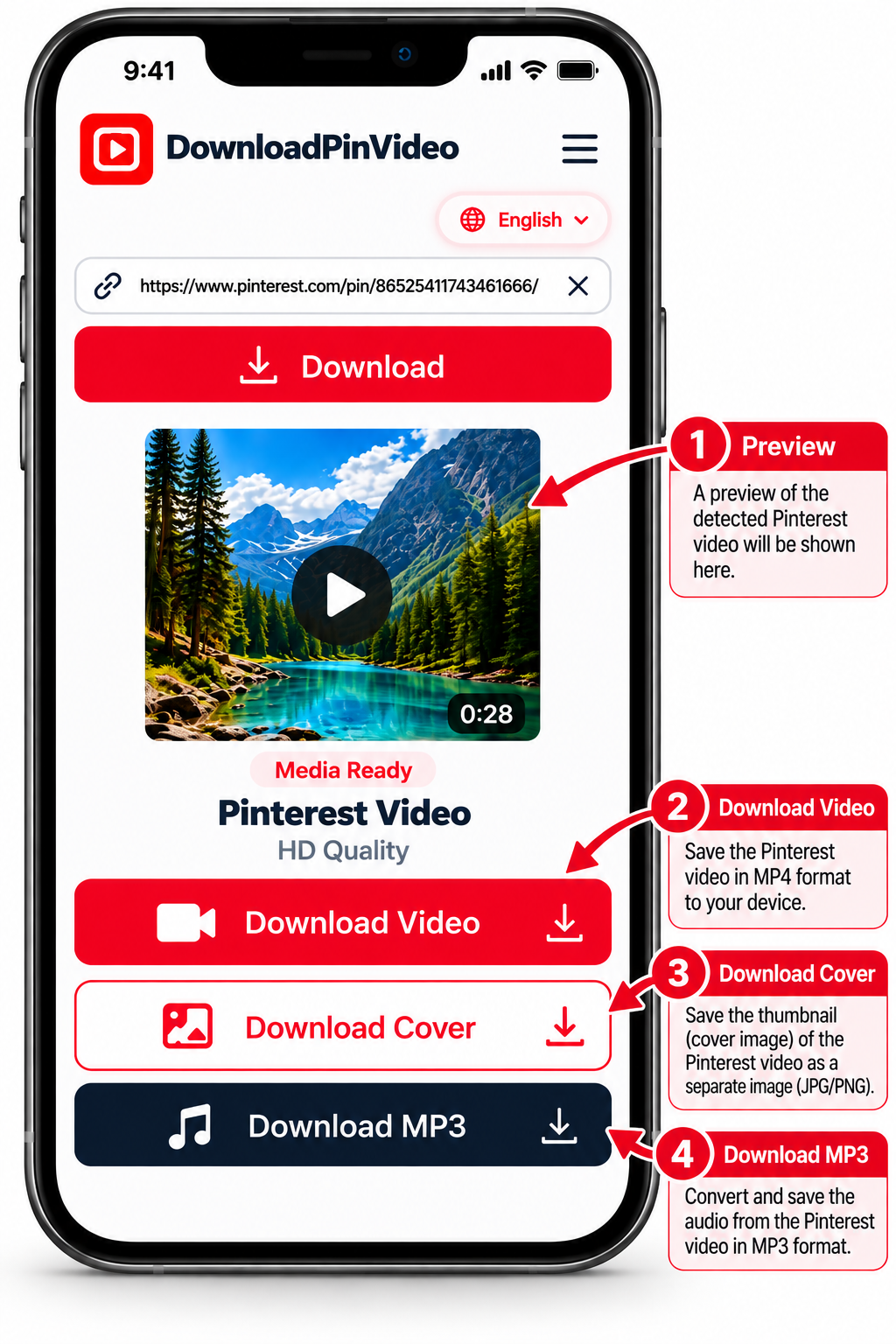
Choose and Save Your File
Preview the detected media and choose the option you need. You can download Pinterest video files when video media is available, save a cover image separately, or choose the audio option for supported video Pins.
Watch How to Download Pinterest Videos
Follow our step-by-step video tutorial to learn how to download Pinterest videos using DownloadPinVideo.
Why Choose DownloadPinVideo?
Clear download choices, useful features, and a simple process from start to finish.
No Confusing Download Links
Clearly labeled download choices help you select the video, cover image, or MP3 audio when available, without misleading buttons.
Multiple Download Options
Save a supported Pinterest video, its cover image, or an MP3 audio file when available for that Pin.
HD, Full HD & 4K Downloads
Download in the best available quality detected by the tool. HD, Full HD, or 4K depends on the source Pin and supported formats.
Built for Simplicity
A clean, straightforward interface keeps the focus on your Pin and the available download options.
No Software Installation
Use the downloader in your browser without installing an app, extra software, or a browser extension.
No Watermark Added
DownloadPinVideo does not add its own watermark to downloaded files. Any watermark already present in the original media remains.
Supported Content
Download different types of media from supported public Pinterest Pins.
Pinterest Video Downloader
Save available Pinterest videos for offline viewing in the best suitable quality detected from the source.
Pinterest Image Downloader
Save supported Pinterest images in their available source quality with our Pinterest Image Downloader.
Pinterest Video Cover Downloader
Save the cover image of a supported Pinterest video Pin separately, when a cover is available.
Pinterest GIF Downloader
Save supported animated Pinterest media when a downloadable GIF or compatible source is available. Pinterest GIF Downloader.
Pinterest MP3 Downloader
Extract and save MP3 audio from supported public Pinterest video Pins when an audio track is available.
Pinterest Download Not Working?
Having trouble saving a Pinterest video? Try these quick fixes for common download problems.
Invalid Pinterest Link
Make sure you copied the complete Pinterest Pin URL. Open the Pin again, select Share, and copy its link.
Private or Unavailable Pin
Check whether the Pin is publicly accessible. Private, deleted, or restricted Pins may not be available for downloading.
Download Not Starting
Check your internet connection and browser download permissions. Then try the download again.
Downloaded File Missing
Check your browser's download history or your device's Downloads folder. The save location depends on your browser settings.
Having Trouble Downloading?
Still having issues with a Pinterest download? Let us know what went wrong so we can investigate.
Download Pinterest Videos on Any Device
Use the same browser-based process across common devices without installing separate desktop software.
Android
Copy the public Pin link, open DownloadPinVideo in your browser, paste the URL, and save the available result.
iPhone & iPad
Process the Pin in your browser and use the available download option. The final save location depends on your browser and iOS settings.
Windows & macOS
Paste the Pin URL into the tool and save the available media through your browser's normal download process.
People searching for video downloader pinterest tools often want something that works across devices without additional software.
Safe Processing of Public Links
A pinterest video downloader safe for normal public-link processing should not require your Pinterest password just to check an accessible Pin.
DownloadPinVideo does not require your Pinterest login credentials for the standard download process.
Private, deleted, restricted, login-only, or otherwise unavailable content may not work.
Respect Creator Rights
Publicly visible content is not automatically free to reuse. Download media only when you own it, have permission, or are otherwise legally permitted to save and use it.
DownloadPinVideo provides a technical downloading tool and does not grant ownership or reuse rights over third-party content.
Frequently Asked Questions
Quick answers to common questions about using DownloadPinVideo.
Is DownloadPinVideo free to use?
Yes. You can process supported public Pinterest links without creating an account or paying for the basic download process.
Can I download Pinterest videos in HD or 4K?
Yes, when Pinterest provides a higher-resolution source for that Pin. Available quality can vary, and 4K is only possible when the original source actually includes a 4K version.
Can I download audio or the cover image from a Pinterest video?
Supported video Pins may provide separate options for the video cover image and audio. The available choices depend on the media detected for that specific Pin.
Why can’t I download videos from Pinterest?
A download may fail if the Pin is private, deleted, restricted, unavailable, or does not provide accessible video media. Temporary connection or source-server issues can also affect the download process.
How do I download a Pinterest video to my iPhone?
Copy the public Pin link in Pinterest, open DownloadPinVideo in your iPhone browser, paste the URL, and choose the available download option. The saved file location depends on your browser and iOS download settings.
Is downloading Pinterest videos legal?
Downloading may be allowed when you own the content, have permission from the creator, or are otherwise legally permitted to save it. Public availability does not automatically mean the content is free to reuse, repost, or distribute.